Trading basics
How to copy a trading bot from Discover
Summary
Copying a public bot gives you your own version of its strategy rules. Read the original entry, exit, and sizing instructions, then inspect the blocks in your copy. If you change one input, keep the original settings and test dates so you can explain what changed.
A trading bot is easier to understand when you can see a complete example. Instead of deciding every rule on a blank canvas, you can examine an existing strategy, follow its logic, and ask what you would change.
That is a useful way to approach Discover in Alphavator. Copying a TBOT gives you a starting point for research. Your next job is to understand the strategy well enough to explain its decisions and test the configuration you intend to use.
This guide walks through that process, from choosing an example to reviewing your own backtest.
What does copying a trading bot mean?
In this tutorial, copying means starting from an existing strategy configuration. You examine rules such as which securities it trades, what triggers a purchase, when it exits, and how it sizes orders.
Automatic copy trading is a different concept: an account may mirror another trader’s transactions. Do not assume that copying a TBOT subscribes you to somebody’s future trades, updates, or performance. Read the copy workflow and check the resulting configuration.
A strategy’s name is only a label. Two bots called “Golden Cross” might use different moving averages, timeframes, position sizes, and exits. The settings determine what they actually do.
1. Choose a strategy you want to understand
Open Discover and select a TBOT whose description you can summarize in one sentence. For a first exercise, a small number of visible conditions is easier to investigate than a strategy combining many unfamiliar indicators.
Write down the underlying idea. For example: “This strategy attempts to participate in an upward trend and leave when the trend weakens.” That sentence is your hypothesis. You will use it to check whether the blocks implement the same idea.
If performance information is shown, establish what it represents. Is it a historical backtest, paper trading, or actual brokerage activity? What dates and settings produced it? The SEC explains that backtested performance is hypothetical, and that performance presentations need to be understood in context. See its guide to evaluating performance claims.
2. Read the rules before copying
Open the available explanation and inspect the strategy details. Answer these questions:
- Market: Which symbols or selection rules determine what can be traded?
- Timing: Is the strategy based on daily bars, shorter intervals, or a rebalance schedule?
- Entry: What exact conditions must be true before an order is considered?
- Exit: What closes a position, including any separate risk rules?
- Sizing: Does a percentage refer to cash, account value, or an existing holding?
Pay attention to the difference between a condition and an event. “The fast average is above the slow average” can remain true for many bars. “The fast average crosses above the slow average” describes a transition. If the written explanation says one thing and the blocks show another, resolve that difference before continuing.
3. Make the copy and inspect the result
Use the selected TBOT’s copy action, then open the resulting strategy in your account. Confirm that you are inspecting the copy before making changes. Give it a descriptive name when that option is available, such as “Daily Trend Learning Version.”
Review the copied symbols, indicator inputs, conditions, and order sizes. Check its execution status and any account or mode selection. Copying a definition should never substitute for your deliberate review of what could execute.
Keep a short note of the original configuration. A document or spreadsheet is enough. Record the source TBOT name, the date you copied it, the inputs, and the question you want to investigate.
4. Change one meaningful input
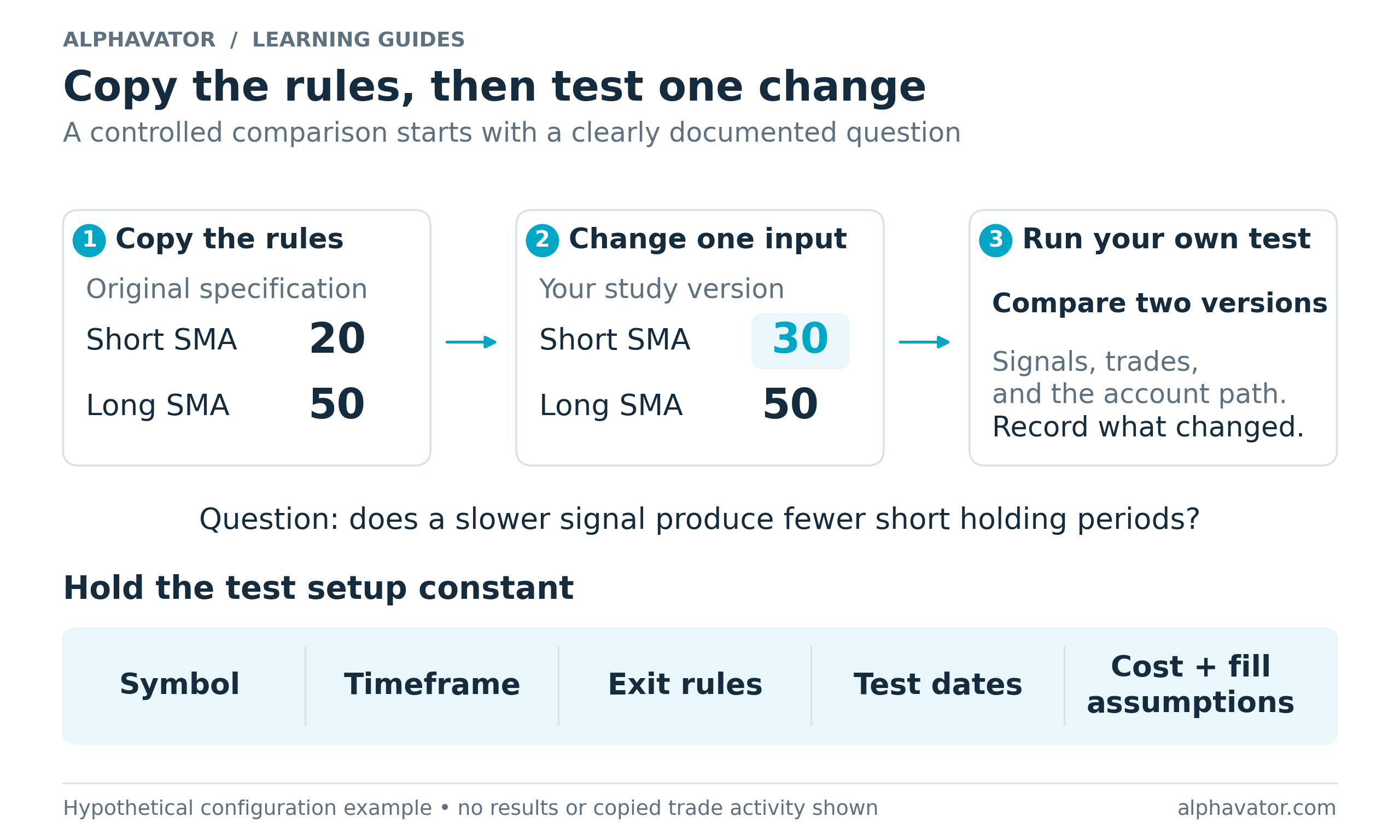
Consider a hypothetical strategy using a 20-period and a 50-period moving average. You might ask whether a slower signal behaves differently by changing the shorter average from 20 to 30 periods.
Keep the symbol, timeframe, exit logic, and test dates the same for that comparison. Otherwise, a difference in results could come from several changes at once.
Write your reason before running the test: “I want to examine whether a slower signal produces fewer short holding periods.” This gives the experiment a purpose beyond finding a larger return number.
There is no requirement to change anything immediately. Reproducing and understanding the original rules can be a valuable first exercise.
5. Run a backtest of your configuration
Test the version you actually saved. Check the selected period, available data, starting capital, and the execution and cost assumptions used by the test. A result cannot be interpreted properly when its assumptions are unknown.
Inspect individual trades alongside the summary. Pick an entry, find the relevant indicator values, and explain why the rule triggered. Repeat for an exit and a losing trade. If you cannot reconcile an action with the rules, investigate that before judging the strategy.
Compare the reported return and trade statistics. Where the necessary data is available, examine drawdown and the number of completed trades, checking how the report defines each measure. Also ask whether the strategy’s behavior fits its stated idea. Our guide to reading backtest results explains how those measures work together.
6. Decide what to investigate next
Your next step might be correcting a rule, testing another period, or observing the strategy with simulated funds. A copied bot does not need to reach live trading for the exercise to be worthwhile.
If you move to paper trading, use a configuration you can recognize and keep a record of your observations. Changing parameters every time a trade loses makes it difficult to learn how any one version behaves.
Alphavator’s visual strategy workflow lets you connect an idea with rules you can inspect. That visibility makes a copied example useful as a learning tool: you can trace what the strategy is trying to do and decide which assumptions deserve more work.
Step-by-step walkthrough
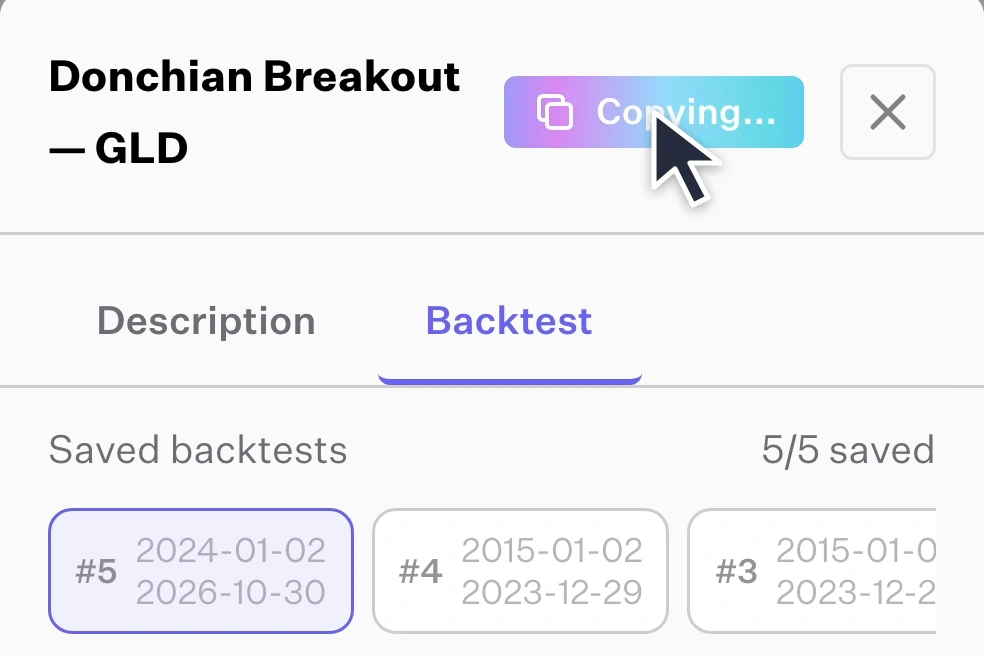
The recording follows Donchian Breakout — GLD from its public preview into My Tbots. Read one simulated trade on the original chart, find the stopped copy, and verify the price thresholds and order sizes in its own buy and sell blocks.
Jump to a step
Step 1
Choose a bot whose rules you can explain
Open Discover and browse the public collections. This walkthrough uses Donchian Breakout — GLD from Algo Trading 101. Open its preview and select Description. A Donchian channel marks the highest high and lowest low over a chosen number of bars. This bot uses different lengths for entry and exit.
For the entry, it compares the daily close to the highest high of the preceding 40 daily bars. For the exit, it compares the close to the lowest low of the preceding 20. Both windows exclude the current bar. Suppose the previous 40-bar high was $250. Would a close of $250 trigger a buy? Would $251? Keep your answers for the block check.
Step 2
Look for a trade that explains the chart
Choose Backtest. If the creator saved several runs, select one and read its dates. In the pictured run, the solid blue line tracks the strategy and the dotted line tracks its benchmark. Look at the long level stretch in the blue line during 2026 while the benchmark continued to move.
The saved run sold GLD on March 18 and bought back on August 10, 2026. Find those two markers. Between them the strategy waited in cash for another breakout. A flat line makes more sense once you know when the bot held GLD. Look for the same pattern during a different saved period before drawing conclusions about the rule.
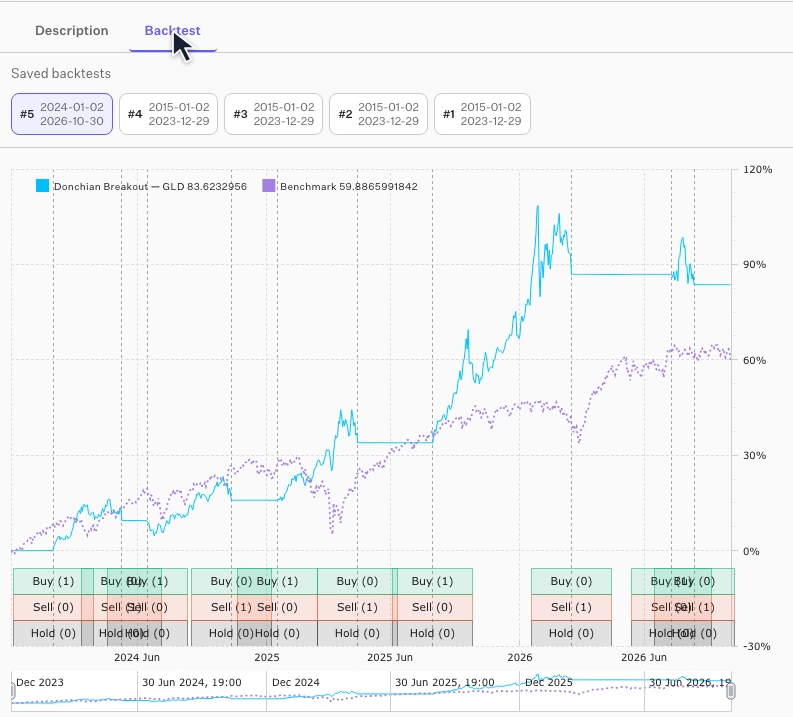
Use the markers below the chart to investigate a flat stretch in the strategy line. Choose a different date range above the chart to investigate another saved run.Full size — Backtest tab for the public strategy with dated runs, two return lines, and buy, sell, and hold markers. (opens in a new tab) Step 3
Find the new copy in My Tbots
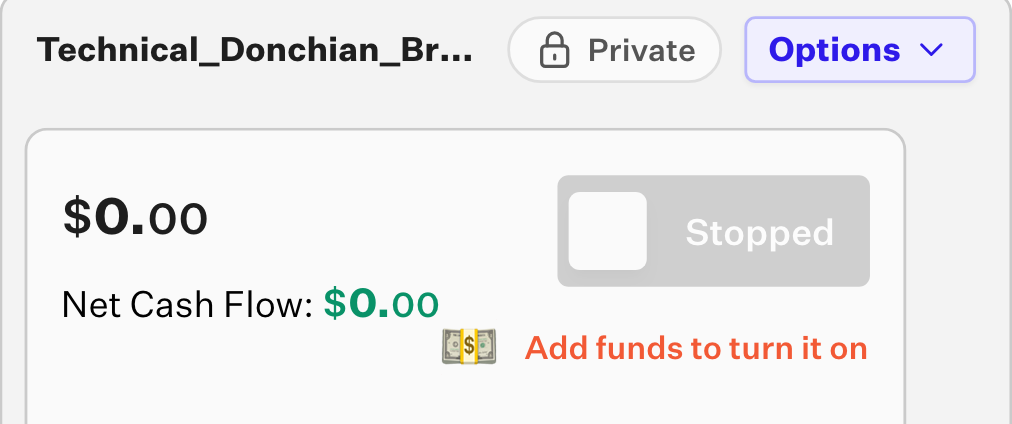
Select Copy Tbot at the top of the preview. After the success message, open My Tbots and look for the name ending in “Copy.” Alphavator uses “Copy 2” and higher numbers when the earlier names are taken. Open the new entry and confirm its dashboard reads Stopped.
Step 4
Check both the trigger and the order size
Expand Build Blocks on your copy. Select Symbols should show GLD. Set Buy compares CURRENT_PRICE with the upper Donchian value using a greater-than sign. For the hypothetical $250 high, $250 fails and $251 passes. Set Sell uses a less-than sign with the lower channel. A price between the two levels leaves both conditions false.
Read the Weight row under each action. In this example a buy uses 100% of the cash available to the bot. A sell exits 100% of its GLD holding. Those percentages answer different questions, and both matter if you give the bot a budget. To study the rule further, open Run Backtest from your copy’s options and try a period outside the saved run you just reviewed.
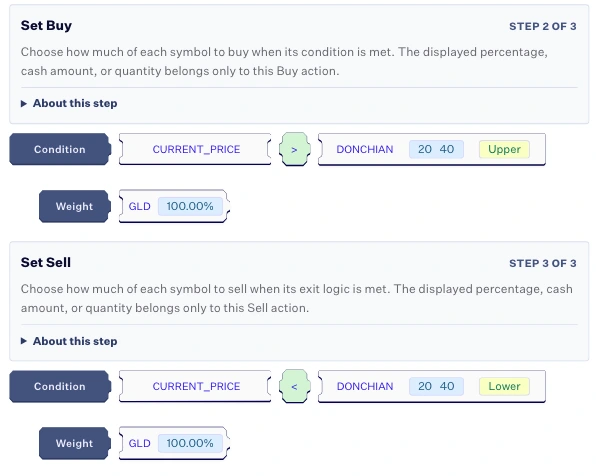
Read each comparison together with the GLD weight beneath it to see when the bot acts and how large an order it requests.Full size — Copied GLD strategy with separate Set Buy and Set Sell blocks comparing current price with the upper and lower Donchian channels. (opens in a new tab)
Frequently asked questions
Will my copy produce the same result?
Do not assume so. Compare the exact rules, dates, data, capital, and execution assumptions first. Changing any of them can change the experiment.
Should I choose the bot with the highest return?
Choose a strategy you can investigate. A headline return leaves out how the result was obtained, what happened during losses, and whether the rules fit your intended use.
What should I learn before changing the blocks?
Be able to explain the entry, exit, timeframe, and order size. Then make a small, documented change with a clear reason.
Start with one strategy and one question
Open Alphavator and explore a TBOT in Discover. Read its rules, make a copy, and test one question you care about. Continue with how to backtest a trading strategy and how to practice with paper money.
This article is educational. Examples are illustrative, and trading involves risk, including loss of capital.