Trading basics
How to practice trading with paper money
Summary
A paper account lets you observe trading rules with simulated money as new prices arrive. Write down the action you expect, then compare it with the order, fill, or decision to wait. Keep track of cash transfers separately so a deposit never looks like trading profit.

You have a trading idea. You can explain when it should buy and when it should sell. Before committing real money, you want to see what happens when those rules meet a moving market.
Paper trading gives you a place to practice. You use simulated funds, observe the strategy as new market data arrives, and investigate whether its behavior matches your expectations. A useful session might reveal a confusing rule, an unexpected order, or a setting you misunderstood.
This guide shows how to turn paper trading into a structured learning exercise and how to use Alphavator as part of that process.
What is paper trading
In this context, paper money means virtual trading funds. Paper orders are simulated rather than executed with real money. You can observe changes in simulated cash, positions, and account value without risking trading capital on those practice orders.
The details depend on the simulator. For example, Alpaca documents how its paper environment simulates fills and where its assumptions differ from live trading. Check the documentation for the paper environment you actually use.
Three stages answer different questions:
| Stage | Question to investigate |
|---|---|
| Backtesting | How would these rules have behaved on historical data under the test assumptions? |
| Paper trading | Do these rules behave as expected as new data arrives in a simulated environment? |
| Live trading | How does the strategy operate with actual orders, actual costs, and real capital at risk? |
Choose a lesson before choosing a profit target
Give the practice session one clear objective. You might want to verify that an entry happens only after a daily candle completes, that an exit sells the intended holding, or that the system does not keep adding to an existing position.
Write down the expected behavior before starting. For a hypothetical moving-average exercise, your note could say: “When the completed daily close is above the selected moving average and no position is held, an entry should become eligible. When the close is below the average, the holding should become eligible for exit.”
Then specify the symbol, moving-average length, position size, evaluation time, and fill assumptions. Those details make an unexpected outcome something you can investigate.
Make the practice conditions realistic
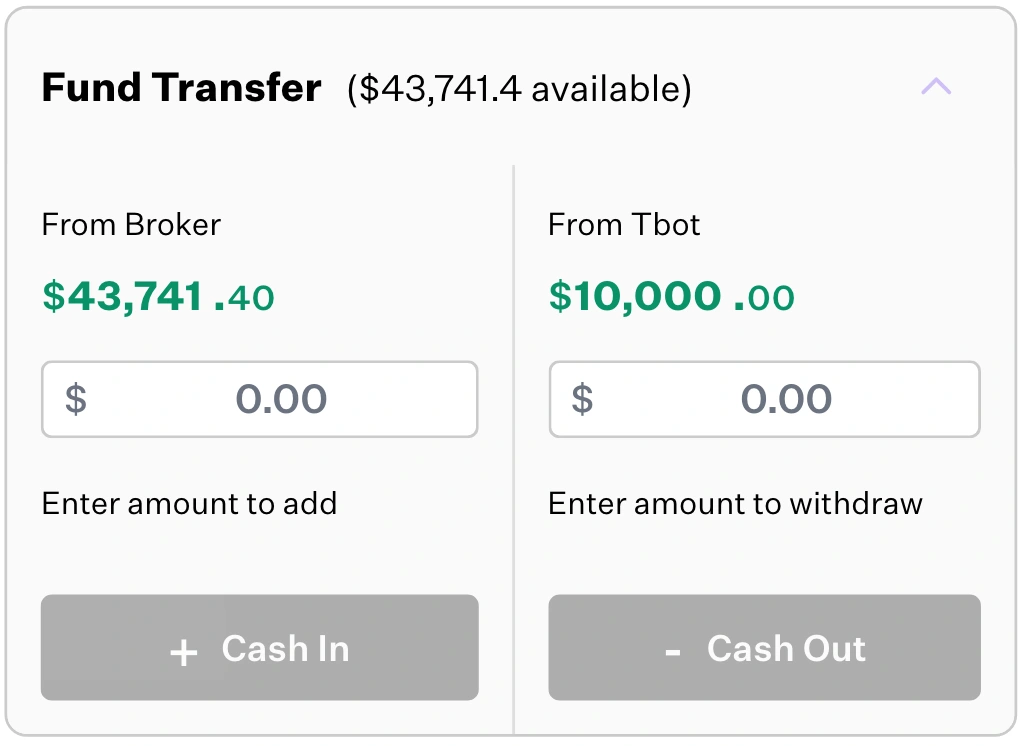
A very large simulated balance can hide practical constraints. If your learning scenario uses $5,000, a million-dollar paper portfolio with unrestricted position sizes answers a different question. These amounts illustrate how to design an exercise; they are not funding recommendations.
Where the paper environment allows it, use a balance consistent with your scenario. Otherwise, limit the exercise to the intended allocation and record the mismatch. Keep leverage, trading frequency, and the number of simultaneous positions consistent with the plan you are trying to understand.
Avoid resetting the account whenever results disappoint. Preserve the history so you can see how the rules behaved through both profitable and losing periods.
How to practice with a TBOT in Alphavator
A TBOT is a trading strategy in Alphavator. Its visual strategy, backtesting, and paper trading workflow lets you work through the rules before considering broker-connected live execution.
- Open a strategy you can explain. Sign in to Alphavator and open your TBOT. Read its entry conditions, exit conditions, selected securities, timeframe, and allocation.
- Review a historical test. Check several trades against the rules. If the historical behavior is confusing, resolve that question before adding a forward simulation.
- Open the paper trading setup. Follow the available setup for the TBOT and confirm the selected environment uses simulated funds. Account requirements and available settings depend on the supported connection.
- Record the starting configuration. Note the strategy name, parameters, starting balance, allocation, and start time in a separate journal.
- Start the paper run and observe its behavior. Confirm once more that the selected environment uses simulated funds, then start the strategy's paper run. Compare the signals, orders, and simulated fills with what you expected, using the information available in Alphavator and the connected paper account.
- Review before changing anything. Explain an unexpected event first. If you revise a rule, record the change and treat the new configuration as a separate experiment.
Keep a small but useful trading journal
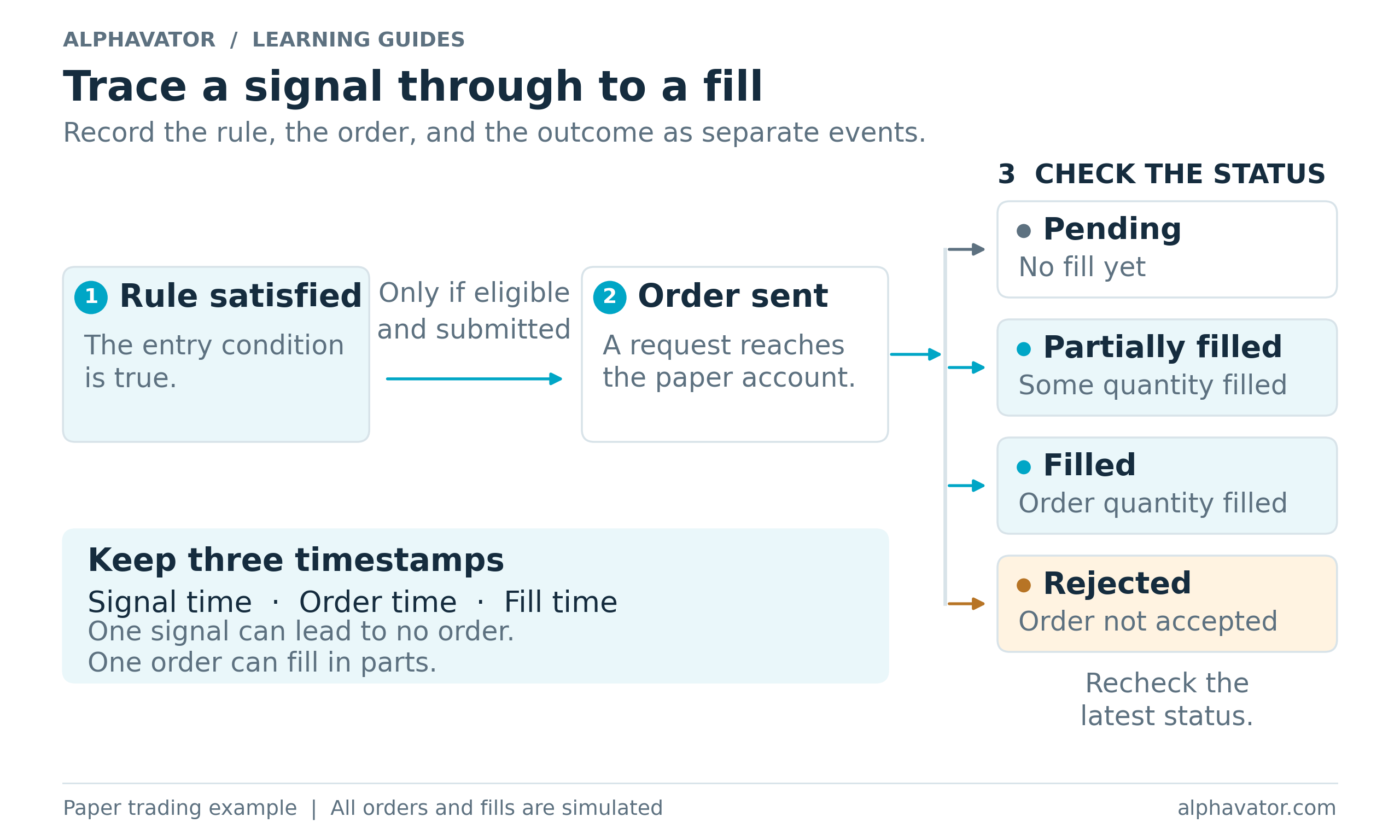
You do not need a complicated spreadsheet. For each event, record the signal time, the rule that was satisfied, the intended action, the submitted order if any, the simulated fill if any, and your explanation.
Keep signals, orders, and fills separate. A satisfied rule does not establish that an order was submitted; an order submission does not establish that it filled. If you expected an entry but see no position, investigate each stage in sequence.
Also record days when nothing should happen. A strategy waiting correctly for its conditions is useful evidence that the rules are behaving as intended.
Understand what the simulation leaves out
Simulated performance can differ from live performance. Alpaca, for example, lists limitations involving market impact, latency-related slippage, queue position, some fees, and dividends in its paper trading documentation. Other environments use their own assumptions.
That means an attractive paper balance needs context. Ask whether a fill was realistic for the order size and security, which costs were included, and whether the data timing matches the intended use.
Real money can also change your decisions. Consider writing down how you would respond to a losing streak before one occurs. The exercise becomes more informative when you follow that plan consistently.
Decide what you learned
There is no universal number of days that proves a strategy is ready. A slow strategy may generate very little evidence in a month; many similar trades during one market condition may still tell a narrow story.
At the review point, ask whether the rules behaved correctly, whether the observed sample answers your question, and which assumptions remain unresolved. If a rule failed, revise and retest it. If very little happened, acknowledge the limited evidence. A profitable simulation alone does not establish an edge.
Step-by-step walkthrough
In the recording, a fresh copy of a GLD breakout bot receives $10,000 in Paper and switches from Stopped to Running. The screenshots show the transfer and status change. The fill calculation in the last step is a separate practice exercise.
Jump to a step
Step 1
Write down what would trigger a buy
Sign in to Alphavator, select Paper in the account header, and open a stopped strategy in My Tbots. You can use a bot you built or one you copied from Discover. Expand Build Blocks and find the symbol, the time frame, the buy condition, and the size of the order.
The example uses a daily GLD breakout strategy. Its entry compares the current price on the daily bar with the highest high of the preceding 40 daily bars. Suppose that level is $250 and GLD is trading at $247. A rise to $249 would still leave the bot waiting. Write down the threshold for your own strategy and what you expect on either side of it.
Step 2
Give the bot a practice budget
On the strategy dashboard, find From Broker. Enter an amount within the available Paper balance, choose Cash In, then check the amount and destination in the confirmation. Select Cash in to transfer simulated funds to this TBOT. The example allocates $10,000 to a new copy. Choose an amount that can cover the order size in your rules.
Before starting the bot, record its value and Net Cash Flow. For the fresh copy shown here, both read $10,000. If you put in another $1,000, both could rise to $11,000 with no trades at all. Net Cash Flow tracks money moved into the bot minus money moved out, so you can separate those transfers from trading gains.
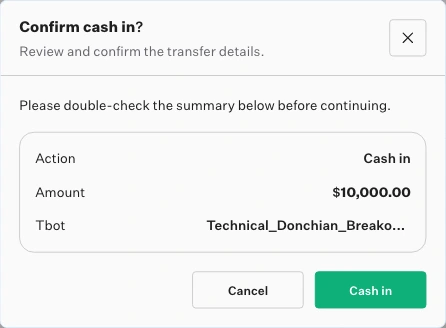
This transfer gives one bot a $10,000 simulated budget. Check its name before confirming.Full size — Confirm cash in dialog showing the target TBOT, a $10,000 amount, and the Cash in button. (opens in a new tab) Step 3
Start in Paper and watch the first decision
With Paper selected, turn on the Stopped switch and wait for Running. Open Trading History. A running strategy can have an empty history while it waits for a signal. If the price is still below your breakout level, write down “wait” and check again when new price data arrives.
When a trade does appear, read its time, ticker, side, quantity, and price per share. Check the price data around that time against your original rule. The price that triggered the decision and the simulated fill price can differ.
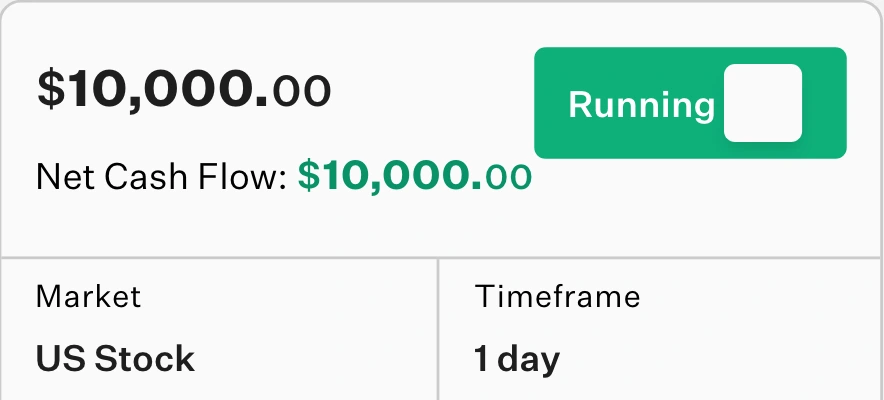
The switch confirms the bot is running. Trading History is where you check for completed trades.Full size — Running switch beside a $10,000 strategy value and $10,000 of net cash flow, with a one-day time frame. (opens in a new tab) Step 4
Account for every dollar in a fill
Try the arithmetic with a hypothetical fill. If two shares cost $25 each, a $10,000 account now holds $9,950 in cash and $50 in shares, ignoring fees. At $27 per share those holdings are worth $54, so the account totals $10,004. The $4 increase is an unrealized gain while the shares are still held.
Do the same calculation with your first paper fill. Record what you expected, what the simulator filled, and any difference you can explain. Real orders can arrive at different prices or find fewer shares available. When you finish practicing, turn the bot off and check for Stopped. Keep your notes alongside the rule for your next session.
Further reading · How Alpaca simulates paper trades
Frequently asked questions
Can I lose real money while paper trading
Practice orders in a confirmed paper environment use simulated funds. Verify the account and environment before starting; live orders use real capital. Platform or data subscription costs, if applicable, are separate from simulated trading results.
Should I skip backtesting and start with paper trading
You can learn from paper trading directly, but a historical test can reveal rule mistakes before you wait for new signals. The two exercises provide different evidence.
Does profitable paper trading mean I will make money live
No. Simulation assumptions, market changes, costs, and execution differences can alter results. Paper trading is one part of evaluating a strategy.
Start with one rule you want to understand
Open your strategy in Alphavator, write down its expected next action, and use paper trading to examine whether the behavior matches the plan.
Continue with how to backtest a trading strategy, how to read backtest results, or how to start algorithmic trading.
Educational content and product examples only. Trading involves risk. Simulated results do not guarantee future performance.